yoga-cards
A browser-based card designer for creating print-ready yoga meditation cards with PDF export, bleed marks, and embedded typography.
The Problem
Designing 40 yoga meditation cards in Figma and manually exporting print-ready PDFs is slow and error-prone. Every text change means re-exporting, checking bleed areas, and embedding fonts — a workflow that doesn't scale for iterative content editing.
The problem
Designing 40 yoga meditation cards in Figma meant every text change triggered the same loop — export PDF, check bleed areas, verify fonts are embedded, fix, re-export. For a deck that went through dozens of content iterations, that workflow didn’t hold up.
I needed a tool where editing text and generating a print-ready PDF was the same step.
What I built
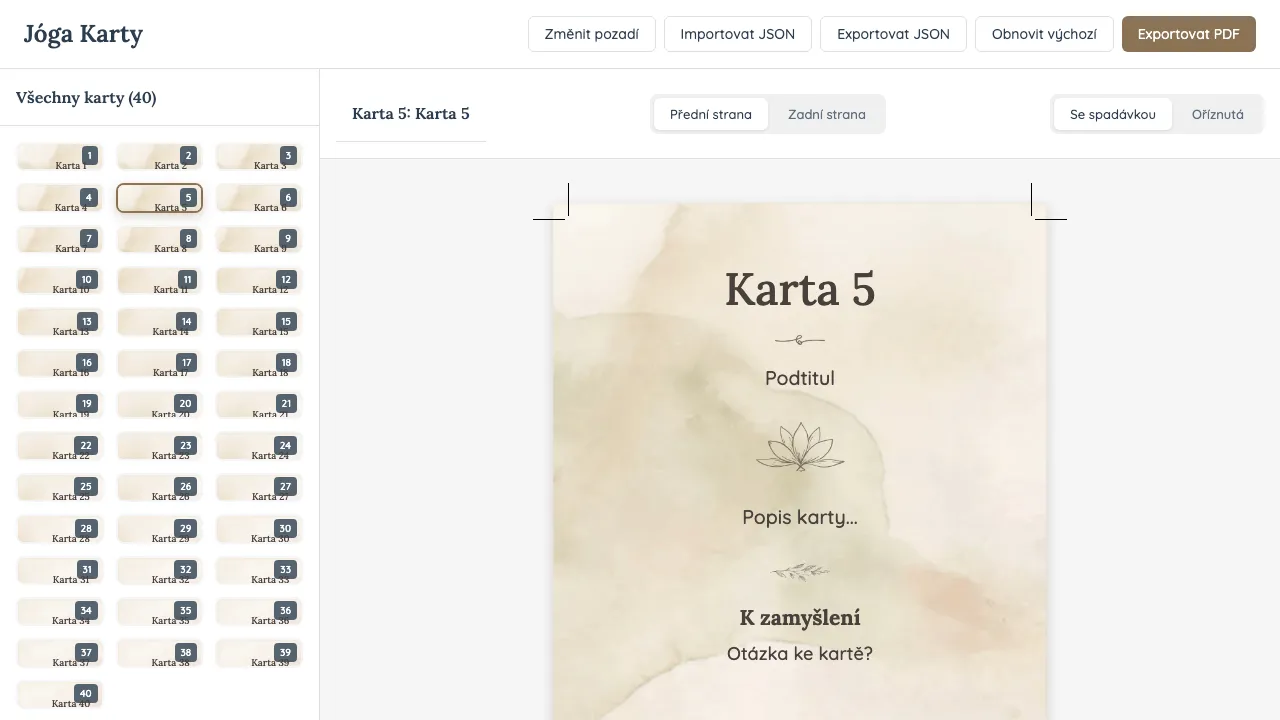
A React app where the card preview is the design tool. Each card shows a Sanskrit yoga concept — title, description, and a reflective question — rendered on a watercolor background. What you see in the browser is exactly what ends up in the PDF.
That “exactly” part was the hardest. The app runs two rendering pipelines from the same layout math — one in CSS for the screen, one in jsPDF at 300 DPI for print. Same font sizes, same positioning, just different coordinate systems (pixels → millimeters → PDF points). Getting those to match required opentype.js for precise text measurement alongside jsPDF for the actual rendering.
The print side handles bleed areas, crop marks, and embedded TrueType fonts — things you normally set up manually in a design tool.
How it’s used
Card content lives in localStorage with JSON export for backup. The yoga instructor edits text directly in the browser and exports the PDF — no Figma, no design handoff.
The finished cards are available at jogasevel.cz/pruvodce-jogou/jogove-karty.
What I learned
The biggest win was eliminating the export-check-fix loop entirely. When the preview matches the output, you stop second-guessing and just iterate on content. The dual rendering pipeline was tricky to get right, but once it worked, every subsequent change was instant.
What I Learned
Precise typography in PDFs requires dual font libraries — opentype.js for accurate text measurement and word wrapping, jsPDF for embedded rendering. The biggest win was making the preview match the print output exactly — WYSIWYG eliminates the export-check-fix loop entirely.